Friday, January 9, 2015

Generate Random Password in SQL Server Store Procedure

Sometimes there is a need to reset a password using a temporary password or generate a random password for a new user. This simple store procedure is creating it.

create proc [dbo].uspRandChars
    @len int,
    @min tinyint = 48,
    @range tinyint = 74,
    @exclude varchar(50) = '0:;<=>?@O[]`^\/',
    @output varchar(50) output
as 
    declare @char char
    set @output = ''
 
    while @len > 0 begin
       select @char = char(round(rand() * @range + @min, 0))
       if charindex(@char, @exclude) = 0 begin
           set @output += @char
           set @len = @len - 1
       end
    end
;
go

  1. LEN - specifies the length of the result (required)
  2. MIN - sets the starting ASCII code (optional: defaults to "48": which is the number zero)
  3. RANGE - determines the range of how many ASCII characters to include (optional: defaults to "74"  (48 + 74 = 122) where 122 is a lowercase "z")
  4. EXCLUDE - a string of characters to exclude from the final output (optional: defaults include zero, capital "O", and these punctuation marks :;<=>?@[]`^\/)
To use the stored procedure issue commands such as the following.

declare @newpwd varchar(20)


-- all values between ASCII code 48 - 122 excluding defaults
exec [dbo].uspRandChars @len=8, @output=@newpwd out
select @newpwd


-- all lower case letters excluding o and l
exec [dbo].uspRandChars @len=10, @min=97, @range=25, @exclude='ol', @output=@newpwd out
select @newpwd


-- all upper case letters excluding O
exec [dbo].uspRandChars @len=12, @min=65, @range=25, @exclude='O', @output=@newpwd out
select @newpwd


-- all numbers between 0 and 9
exec [dbo].uspRandChars @len=14, @min=48, @range=9, @exclude='', @output=@newpwd out
select @newpwd

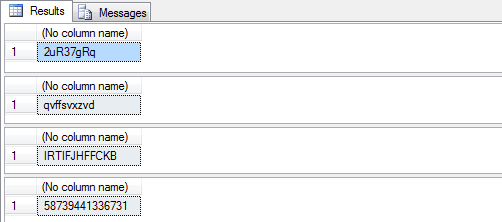
Here is sample output from the above commands:
Reference : http://www.mssqltips.com/sqlservertip/2534/sql-server-stored-procedure-to-generate-random-passwords/
Friday, December 26, 2014

How to make a copy of a existing database into new database

This feature is not available in Express version.

Right Click on database -> Task -> Copy Database.

It will open a wizard you have to follow, where you will have to select the source database and enter a new database name to copy whole database objects into the newer one.

Saturday, August 30, 2014

How to round to the nearest whole number in C# ?

I have Googled for it and found some interesting answers:

My problem was solved by simple using on Math.Ceiling

var wholeNumber = (int)Math.Ceiling(fractionalNumber);

And other interesting answers are :

Math.Ceiling
always rounds up (towards the ceiling)
Math.Floor
always rounds down (towards to floor)


References :

Friday, August 22, 2014

Microsoft Report Viewer Print Button not Working / Visible in IE 10 & 11


I had created report in on of my client website using "Microsoft Report Viewer Control" but a very known problem with Report Viewer is Printing is not possible in other browser instead of Internet Explorer.

Today I have faced a new problem that Print Button is not visible in IE 11 when Client updated their  Windows 8 to Windows 8.1. 


Then I started goggling and Finally I found  that it's happens because of Active X. And I followed these steps give below.

  •  Start Windows Internet Explorer.
  • On the Tools menu, click Internet Options.
  • On the Security tab, click Local Intranet, and then click Sites
  • Click Advanced.
  • Type the URL of your site in the Add this website to the zone box, and then click Add.  (in development mode it will be http://localhost)
  • Click Close to close the Local Intranet dialog box, and then click OK.
  • On the Security tab, click Custom Level.
  • Click Enable for each component that is listed under ActiveX controls and plugins.
  • Click OK to close the Internet Options dialog box.
  • Restart Internet Explorer
  • Try printing the report.

It's working fine now !!!.

Hope it will help you. :)

Friday, May 9, 2014

Maintain Scroll Position on Postback in ASP.NET

After a long time googling I have got a good solutions to maintain scroll position. See the post given below.

This article shows how to allows pages to automatically maintain the current scroll position across postbacks.
The MaintainScrollPositionOnPostback page directive attribute allows to do that.
This feature is useful for large pages where scrolling is necessary to view input controls down further on the page.
There are three ways of applying the property to a web page.

  1. You can set it programmatically 
    Page.MaintainScrollPositionOnPostBack = true;
  2. In the page declaration 
    <%@ Page MaintainScrollPositionOnPostback="true" %>
  3. Or in the web.configs <system.web> section. 
    <pages maintainScrollPositionOnPostBack="true" />
I have used 3 point & It's working absolutely fine.
 
This feature is an absolute must-have on large web pages built for postback scenarios.
A simple but very useful feature.

Smartnavigation = true  implemented the same feature in 1.1 framework SmartNavigation only had "issues" and it only worked in IE but the new MaintainScrollPositionOnPostback apparently works in most common browsers.


Monday, March 31, 2014

Generate a unique alphanumeric password using SQL


DECLARE @PwdLen SMALLINT,
@Chr TINYINT,
@Password VARCHAR(20)

-- Seed
SET @Chr = RAND(DATEPART(ms, GETDATE())) * 0
SET @Password = ''

SET @PwdLen = 1
WHILE @PwdLen < 8
BEGIN
SET @Chr = RAND() * 62
SET @Password = @Password + CHAR(
CASE WHEN @Chr < 10 THEN @Chr + 48 
WHEN @Chr BETWEEN 10 AND 35 THEN @Chr + 55 
ELSE @Chr + 61 
END)

SET @PwdLen = @PwdLen + 1
END

SELECT @Password [Password]

Wednesday, March 19, 2014

SQL statement which will give me all the days of a given month as individual rows

Hi friends,

I have searched a lot in Google and finally I found that its too easy to get the result. Check the query given below.

DECLARE @month    INT
DECLARE @year    INT
SET @month=2
SET @year = 2016

SELECT CAST(CAST(@year AS VARCHAR) + '-' + CAST(@Month AS VARCHAR) + '-01' AS DATETIME) + Number 'date'
FROM master..spt_values WHERE type = 'P'
AND
(CAST(CAST(@year AS VARCHAR) + '-' + CAST(@Month AS VARCHAR) + '-01' AS DATETIME) + Number )
<
DATEADD(mm,1,CAST(CAST(@year AS VARCHAR) + '-' + CAST(@Month AS VARCHAR) + '-01' AS DATETIME) )


Saturday, February 22, 2014

Last modified Tables & Stored Procedures details in Microsoft SQL Server

Let's find out the last modified Tables & Stored Procedures details in MSSQL by writting a simple Query.

For User Tables
SELECT * FROM sys.objects WHERE type='U' ORDER BY modify_date DESC

For Stored Procedures
SELECT * FROM sys.objects WHERE type='P' ORDER BY modify_date DESC

These Queries fetching records from system object table order by last modified date & time.  

Friday, February 21, 2014

Enable remote connections for SQL Server Express 2012

  1. Run SQL Server Configuration Manager.
  2. Go to SQL Server Network Configuration > Protocols for SQLEXPRESS.
  3. Make sure TCP/IP is enabled.
So far, so good, and entirely expected. But then:
  1. Right-click on TCP/IP and select Properties.
  2. Verify that, under IP2, the IP Address is set to the computer's IP address on the local subnet.
  3. Scroll down to IPAll.
  4. Make sure that TCP Dynamic Ports is blank. (Mine was set to some 5-digit port number.)
  5. Make sure that TCP Port is set to 1433. (Mine was blank.)
(Also, if you follow these steps, it's not necessary to enable SQL Server Browser, and you only need to allow port 1433, not 1434.)

Monday, January 27, 2014

Files on External/Flash Drive Changed to Shortcuts Virus

Issue

I caught a virus on my flash drive at work and it appears to have changed all my file names to short cuts. I believe I’ve cleaned the virus but how do i get my files back so that I can view them?

Solution

  1. If you did not format your flash drive, then check whether the files are not in hidden mode.
  2. Click on “Start” –>Run–>type cmd and click on OK.
  3. Check your external Drive letter in My Computer
  4. Here I assume your external drive as G:
  5. Enter this command.attrib -h -r -s /s /d g:*.* 
  6. Delete the unnecessary shortcuts.
Note: Replace the letter g with your flash drive letter.
Still problem? Write down in comments section.


Tuesday, December 10, 2013

Want 5 digit string which is incremented automatic (A0001 - Z9999)

The first thing you need is a table to hold your generated keys:


CREATE TABLE [dbo].[IdGenerator](
    [Id] [int] IDENTITY(1,1) NOT NULL,
    [Pk] [varchar](5) NOT NULL
)
 
-- Insert the first key
INSERT INTO IdGenerator (Pk) VALUES ('A0001')

It contains 2 columns. Id (the primary key, used to order your keys) and the key you want!

Then you need this script to generate a new Key base on the previous one:

-- Declare some variables we need
DECLARE @PK varchar(5)
DECLARE @Character char(1)
DECLARE @Number int
 
-- Get the last generated key (I'll call it @PK)
SET @PK = (SELECT TOP 1 PK FROM IdGenerator Order by Id desc)
-- Extract the character (A,B,C ...)
SET @Character = (SELECT SUBSTRING (@PK ,1, 1))
-- Extract the number (4 last characters. "0001", "0002"....)
SET @Number = (SELECT SUBSTRING (@PK ,2, 4))
 
-- Increase the number by 1
SET @Number = @Number + 1
 
-- Check if the number has reached the top (9999)
IF @Number > 9999
BEGIN
   -- If it has, set it to 1
   SET @Number = 1
   -- And find the next character in the alphabet (A->B, B->C...)
   SET @Character = char(ascii(@Character)+1)
END
 
-- Pad your number (1->0001, 2->0002...) and set you newly generated key
SET @PK = @Character + REPLACE(STR(@Number, 4), SPACE(1), '0')
 
-- Insert it to the IdGenerator table so we can use it for the next key
INSERT INTO IdGenerator (PK) VALUES (@PK)
 
-- And heres your new unique key :)
SELECT @PK

For this to work, you will have to add the first value (A0001) manually. And you
You can put this code in a stored procedure.


Reference : http://www.codeproject.com/Questions/441365/want-7-digit-string-which-is-incremented-automatic

Friday, November 29, 2013

How to know last updated Tables / Stored Procedures in Microsoft SQL Server 2008

Very simple query will return the result. How to know the last updated Tables / Stored Procedures in Microsoft SQL Server 2008.

Here is the query given below.


For Stored Procedures 


SELECT * FROM sys.objects WHERE type='P' ORDER BY modify_date DESC 

And for Tables 


SELECT * FROM sys.objects WHERE type='U' ORDER BY modify_date DESC 


Hope this will help !!!!!

Thanks
Solomon S.
(http://www.solomonsarkar.com)

Saturday, March 9, 2013

Sending a DataTable to a Stored Procedure

I found this beautiful article from  CodeProject written by _Amy

Introduction

This is a small article explaining how to send an entire data-table to a Stored Procedure in the database server as an input parameter. 

Background 

It uses a logic which allows us to do add, modify, and delete operations on a set of records in the database using a simple form. The details also need to be shown after adding, updating, and deleting of records in a table. And the data-table should be given to a stored procedure to perform the operations. This feature will work with SQL Server 2008.

Advantages  

  1. For each event on the page the form will not be interacting with the database. This reduces server round trips. 
  2. All necessary operations such as:
    1. Inserting a new record
    2. Updating an existing record
    3. Deleting an existing record
    are performed on client side only. They will be persisted in the database only after getting confirmation from the user. So, the performance of the application will improve.
  3. After performing a certain action (such as Insert, Update, or Delete) on the grid-view the data will be saved in “Session”. And whenever the data is required, it is be fetched from the Session. 
  4. We send the entire data-table from the session to the database for manipulation, and with the use of a Stored Procedure we can do operations such as insert, delete, and update.
  5. It is easier to perform all operations on a set of rows at a time.
  6. The user can deal with thousands of data-rows at the same time without a connection.
  7. Extends the functionality of programming in a database engine.

Using the code

When a page is getting loaded the first time, data from the database is loaded to a data-table. In that data-table a column is added (named Operation). Whenever the user performs an action on the grid-view, the indicator bit is added to that column for that record (Insert 0, Update 1, and Delete 2). If the user clicks on a delete link on a particular row then the operation column of that row is updated to 2, and in the RowDataBound event of the grid-view we hide the records whose operation bit is 2. The temporary table is stored in session state. Before performing any operation, the session table will be called and the action will be performed on that table and again that table will be stored in the session. After performing all the necessary operations, when the user clicks on the Save button, the functionfnMangeOperations is called which will filter all the rows on which the operation was performed and the Save button will send only those details in which the operation has to be performed (you can find the functionfnMangeOperations in the source code from the attached files). 

Step 1: Declaring global variables:  

private clsEmpDetails _objEmpDetails;
private DataTable _dtEmpDetails;
private DataTable _dtEmpDetailsVals;
Step 2: Initializing the data members when page loads.

protected void Page_Load(object sender, EventArgs e)
{
    if (!IsPostBack)
    {
        _objEmpDetails = new clsEmpDetails();
        _dtEmpDetails = _objEmpDetails.fnGetDetails();
        if(_dtEmpDetails != null){
           //Adding a new column to the table which will store the operation details
           //For new insert it will store 1
           //For updating the existing record it will store 0
           _dtEmpDetails.Columns.Add("Operation", typeof(string));
           Session["EmpDetails"] = _dtEmpDetails;
           gvEmpDetails.DataSource = _dtEmpDetails;
           gvEmpDetails.DataBind();
        }       
    }
}
Just store the data in session and maintain the indicator for each operation. The operation will be like this:
protected void gvEmpDetails_RowCommand(object sender, GridViewCommandEventArgs e)
{
    if (e.CommandName == "AddNew") 
    {
       try{
            _dtEmpDetails = Session["EmpDetails"] as DataTable;
            string strID = (TextBox)gvEmpDetails.FooterRow.Cells[0].FindControl("txtInsID")).Text;
            string strName = (TextBox)gvEmpDetails.FooterRow.Cells[1].FindControl("txtInsName")).Text;
            string strAddress = (TextBox)gvEmpDetails.FooterRow.Cells[1].FindControl("txtInsAddress")).Text;
            _dtEmpDetails.Rows.Add(strID, strName, strAddress, "0");
            Session["EmpDetails"] = _dtEmpDetails;
            fnBindEmpDetails(); //This function will bind the data to the gridview by fetching the data from session
        }
        catch(Exception ex){            
             //Handle your exception
        }
    }
}
On click of the Save button, call the following function by passing your DataTable as a parameter.
public string fnStoredProc(DataTable dtDetails)
{
    string strMsg = "";
    try
    {
        fnConOpen();//Function for opening connection
        SqlCommand cmdProc = new SqlCommand("spEmpDetails", con);
        cmdProc.CommandType = CommandType.StoredProcedure;
        cmdProc.Parameters.AddWithValue("@Type", "InsertDetails");
        cmdProc.Parameters.AddWithValue("@Details", dtDetails);
        cmdProc.ExecuteNonQuery();
        strMsg = "Saved successfully.";
    }
    catch (SqlException e) {
        //strMsg = "Data not saved successfully.";
        strMsg = e.Message.ToString();
    }
    finally 
    {
        fnConClose();//Function for closing connection

    }
    return strMsg;
}

Procedure structure

First create a table type with matching columns which comes from the front-end. In this case:
/*Creating type for the procedure parameter*/
CREATE TYPE EmpType AS TABLE 
(
    ID INT, Name VARCHAR(3000), Address VARCHAR(8000), Operation SMALLINT
)
Write the procedure for the operations.
ALTER PROCEDURE spEmpDetails
@Type VARCHAR(15),
@Details EmpType READONLY
AS
BEGIN
    IF(@Type='FetchDetails')
        SELECT * FROM EmployeeDetails
    ELSE
        BEGIN
            --For deleting the details from the table
            DELETE FROM EmployeeDetails WHERE ID IN(SELECT ID FROM @Details WHERE Operation=2)
            
            --For updating the details in the table
            UPDATE e SET e.Name=d.Name, e.Address=d.Address FROM EmployeeDetails e, @Details d 
            WHERE d.ID=e.ID and d.Operation=1
            
            --For inserting the new records in the table
            INSERT INTO EmployeeDetails(ID, Name, Address) 
            SELECT ID, Name, Address FROM @Details WHERE Operation=0;
        END
    END
GO
Note: This procedure takes a datatabe as its parameter and performs insert, update, and delete operations based on the table data.