Hi Please find the Solution in the URL given below.
https://www.samnoble.co.uk/2014/11/30/visual-studio-crashes-and-a-corrupted-cs-file/
For me Solution 4 has worked.
Hi Please find the Solution in the URL given below.
https://www.samnoble.co.uk/2014/11/30/visual-studio-crashes-and-a-corrupted-cs-file/
For me Solution 4 has worked.
SELECTt.NAME AS TableName,s.Name AS SchemaName,p.rows AS RowCounts,SUM(a.total_pages) * 8 AS TotalSpaceKB,CAST(ROUND(((SUM(a.total_pages) * 8) / 1024.00), 2) AS NUMERIC(36, 2)) AS TotalSpaceMB,SUM(a.used_pages) * 8 AS UsedSpaceKB,CAST(ROUND(((SUM(a.used_pages) * 8) / 1024.00), 2) AS NUMERIC(36, 2)) AS UsedSpaceMB,(SUM(a.total_pages) - SUM(a.used_pages)) * 8 AS UnusedSpaceKB,CAST(ROUND(((SUM(a.total_pages) - SUM(a.used_pages)) * 8) / 1024.00, 2) AS NUMERIC(36, 2)) AS UnusedSpaceMBFROMsys.tables tINNER JOINsys.indexes i ON t.OBJECT_ID = i.object_idINNER JOINsys.partitions p ON i.object_id = p.OBJECT_ID AND i.index_id = p.index_idINNER JOINsys.allocation_units a ON p.partition_id = a.container_idLEFT OUTER JOINsys.schemas s ON t.schema_id = s.schema_idWHEREt.NAME NOT LIKE 'dt%'AND t.is_ms_shipped = 0AND i.OBJECT_ID > 255GROUP BYt.Name, s.Name, p.RowsORDER BYt.Name
Install-Package Microsoft.AspNet.FriendlyUrls -Version 1.0.2
Control on Page<script src="https://ajax.googleapis.com/ajax/libs/jquery/3.2.1/jquery.min.js" type="text/javascript"></script><script type="text/javascript">// Linking the print function to the print button$(document).ready(function () {$('#printreport').click(function () {//alert('Hi');printReport('ReportViewer1');});function printReport(report_ID) {var rv1 = $('#' + report_ID);var iDoc = rv1.parents('html');// Reading the report stylesvar styles = iDoc.find("head style[id$='ReportControl_styles']").html();if ((styles == undefined) || (styles == '')) {iDoc.find('head script').each(function () {var cnt = $(this).html();var p1 = cnt.indexOf('ReportStyles":"');if (p1 > 0) {p1 += 15;var p2 = cnt.indexOf('"', p1);styles = cnt.substr(p1, p2 - p1);}});}if (styles == '') { alert("Cannot generate styles, Displaying without styles.."); }styles = '<style type="text/css">' + styles + "</style>";// Reading the report htmlvar table = rv1.find("div[id$='_oReportDiv']");if (table == undefined) {alert("Report source not found.");return;}// Generating a copy of the report in a new windowvar docType = '<!DOCTYPE HTML PUBLIC "-//W3C//DTD HTML 4.01//EN" "http://www.w3.org/TR/html4/loose.dtd">';var docCnt = styles + table.parent().html();var docHead = '<style>body{margin:0;padding:0; line-height: 0.5em;} @page { size: A4; margin: 0;} @media print { html, body { width: 210mm; height: 297mm; }} @media print { footer { page-break-after: always; }} td {padding:0;}</style>';var winAttr = "location=yes, statusbar=no, directories=no, menubar=no, titlebar=no, toolbar=no, dependent=no, width=900px, height=700px, resizable=yes, screenX=100, screenY=100, personalbar=no, scrollbars=yes";;var newWin = window.open("", "_blank", winAttr);writeDoc = newWin.document;writeDoc.open();writeDoc.write(docType + '<html>' + docHead + '<body onload="window.print();">' + docCnt + '</body></html>');writeDoc.close();// The print event will fire as soon as the window loadsnewWin.focus();// uncomment to autoclose the preview window when printing is confirmed or canceled.// newWin.close();};});</script>
<input id="printreport" type="button" value="Print" />
<rsweb:ReportViewer ID="ReportViewer1" runat="server" Font-Names="Verdana" Font-Size="8pt" InteractiveDeviceInfos="(Collection)" ShowExportControls="true" WaitMessageFont-Names="Verdana" WaitMessageFont-Size="14pt" Height="600px" Width="820px" ShowPrintButton="true">
<LocalReport ReportPath="report.rdlc"> </LocalReport>
</rsweb:ReportViewer>
<asp:ImageButton ID="btnPrint" runat="server" OnClick="btnPrint_Click" ImageUrl="https://cdn3.iconfinder.com/data/icons/black-easy/512/535129-print_512x512.png" Height="50px" />
<rsweb:ReportViewer ID="ReportViewer1" runat="server" Font-Names="Verdana" Font-Size="8pt" InteractiveDeviceInfos="(Collection)" ShowExportControls="true" WaitMessageFont-Names="Verdana" WaitMessageFont-Size="14pt" Height="600px" Width="820px" ShowPrintButton="true">
<LocalReport ReportPath="report.rdlc"> </LocalReport>
</rsweb:ReportViewer>
using System.IO;
using iTextSharp.text.pdf;
using iTextSharp.text;
using Microsoft.Reporting.WebForms;
protected void btnPrint_Click(object sender, ImageClickEventArgs e)
{
Warning[] warnings;
string[] streamids;
string mimeType;
string encoding;
string extension;
byte[] bytes = ReportViewer1.LocalReport.Render("PDF", null, out mimeType,
out encoding, out extension, out streamids, out warnings);
FileStream fs = new FileStream(HttpContext.Current.Server.MapPath("output.pdf"), FileMode.Create);
fs.Write(bytes, 0, bytes.Length);
fs.Close();
//Open exsisting pdf
Document document = new Document(PageSize.A4);
PdfReader reader = new PdfReader(HttpContext.Current.Server.MapPath("output.pdf"));
//Getting a instance of new pdf wrtiter
PdfWriter writer = PdfWriter.GetInstance(document, new FileStream(
HttpContext.Current.Server.MapPath("Print.pdf"), FileMode.Create));
document.Open();
PdfContentByte cb = writer.DirectContent;
int i = 0;
int p = 0;
int n = reader.NumberOfPages;
Rectangle psize = reader.GetPageSize(1);
float width = psize.Width;
float height = psize.Height;
//Add Page to new document
while (i < n)
{
document.NewPage();
p++; i++;
PdfImportedPage page1 = writer.GetImportedPage(reader, i);
cb.AddTemplate(page1, 0, 0);
}
//Attach javascript to the document
PdfAction jAction = PdfAction.JavaScript("this.print(true);\r", writer);
writer.AddJavaScript(jAction);
document.Close();
//Attach pdf to the iframe
frmPrint.Attributes["src"] = "Print.pdf";
}
This solution has been checked in Windows, Mac & Ubuntu with Chrome & FireFox Browser
Microsoft.ACE.OLEDB.12.0' provider is not registered on the local machineAnd we google for it and download 2007 Office System Driver: Data Connectivity Components and install it on the server but the problem never solved because its 32 Bits application you need to download 64 Bit Driver.
Where ObjectName can be the name of a table, a view or a stored procedure. The problem seems to be getting the list of all database objects with a given shcema name. Thankfully, there is a system table named sys.Objects that stores all database objects. The following query will generate all needed SQL scripts to complete this task:ALTER SCHEMA NewSchemaName TRANSFER OldSchemaName.ObjectName
Where type 'U' denotes user tables, 'V' denotes views and 'P' denotes stored procedures.SELECT 'ALTER SCHEMA NewSchemaName TRANSFER [' + SysSchemas.Name + '].[' + DbObjects.Name + '];' FROM sys.Objects DbObjects INNER JOIN sys.Schemas SysSchemas ON DbObjects.schema_id = SysSchemas.schema_id WHERE SysSchemas.Name = 'OldSchemaName' AND (DbObjects.Type IN ('U', 'P', 'V'))
use master
go
sp_configure 'show advanced options',1
go
reconfigure with override
go
sp_configure 'Database Mail XPs',1
--go
--sp_configure 'SQL Mail XPs',0
go
reconfigure
go
EXECUTE msdb.dbo.sysmail_add_account_sp
@account_name = 'TestMailAccount',
@description = 'Mail account for Database Mail',
@email_address = 'tanmaya@mydomain.com',
@display_name = 'MyAccount',
@username='tanmaya@mydomain.com',
@password='1qwe432',
@mailserver_name = 'mail.mydomain.com'
EXECUTE msdb.dbo.sysmail_add_profile_sp
@profile_name = 'TestMailProfile',
@description = 'Profile needed for database mail'
EXECUTE msdb.dbo.sysmail_add_profileaccount_sp
@profile_name = 'TestMailProfile',
@account_name = 'TestMailAccount',
@sequence_number = 1
EXECUTE msdb.dbo.sysmail_add_principalprofile_sp
@profile_name = 'TestMailProfile',
@principal_name = 'public',
@is_default = 1 ;
UPDATE msdb.dbo.sysmail_server SET enable_ssl=1
declare @body1 varchar(100)
set @body1 = 'Server :'+@@servername+ ' Test DB Email '
EXEC msdb.dbo.sp_send_dbmail @recipients='tanmaya@mydomain.com',
@subject = 'Test',
@body = @body1,
@body_format = 'HTML' ;
SELECT * FROM msdb.dbo.sysmail_event_log
CREATE TABLE #RowCountsAndSizes (TableName NVARCHAR(128),rows CHAR(11),
reserved VARCHAR(18),data VARCHAR(18),index_size VARCHAR(18),
unused VARCHAR(18))
EXEC sp_MSForEachTable 'INSERT INTO #RowCountsAndSizes EXEC sp_spaceused ''?'' '
SELECT TableName,CONVERT(bigint,rows) AS NumberOfRows,
CONVERT(bigint,left(reserved,len(reserved)-3)) AS SizeinKB
FROM #RowCountsAndSizes
ORDER BY NumberOfRows DESC,SizeinKB DESC,TableName
DROP TABLE #RowCountsAndSizes
create proc [dbo].uspRandChars
    @len int,
    @min tinyint = 48,
    @range tinyint = 74,
    @exclude varchar(50) = '0:;<=>?@O[]`^\/',
    @output varchar(50) output
as
    declare @char char
    set @output = ''

    while @len > 0 begin
       select @char = char(round(rand() * @range + @min, 0))
       if charindex(@char, @exclude) = 0 begin
           set @output += @char
           set @len = @len - 1
       end
    end
;
go
- LEN - specifies the length of the result (required)
- MIN - sets the starting ASCII code (optional: defaults to "48": which is the number zero)
- RANGE - determines the range of how many ASCII characters to include (optional: defaults to "74" (48 + 74 = 122) where 122 is a lowercase "z")
- EXCLUDE - a string of characters to exclude from the final output (optional: defaults include zero, capital "O", and these punctuation marks :;<=>?@[]`^\/)
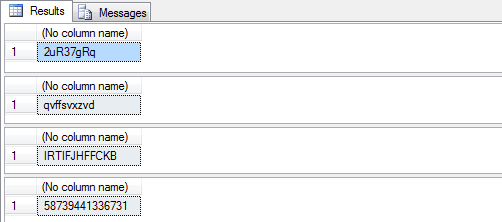
To use the stored procedure issue commands such as the following.
declare @newpwd varchar(20) -- all values between ASCII code 48 - 122 excluding defaults exec [dbo].uspRandChars @len=8, @output=@newpwd out select @newpwd -- all lower case letters excluding o and l exec [dbo].uspRandChars @len=10, @min=97, @range=25, @exclude='ol', @output=@newpwd out select @newpwd -- all upper case letters excluding O exec [dbo].uspRandChars @len=12, @min=65, @range=25, @exclude='O', @output=@newpwd out select @newpwd -- all numbers between 0 and 9 exec [dbo].uspRandChars @len=14, @min=48, @range=9, @exclude='', @output=@newpwd out select @newpwdHere is sample output from the above commands:Reference : http://www.mssqltips.com/sqlservertip/2534/sql-server-stored-procedure-to-generate-random-passwords/
var wholeNumber = (int)Math.Ceiling(fractionalNumber);Math.CeilingMath.Floor