Tuesday, January 21, 2020


Wednesday, October 3, 2018
Find table size in SQL Server
Hi There,
Worried about how to find which table contains more records, Which table consuming more space in your database.
Just simply run the Query given below. Your problem solved.
Hope it will help you!. If yes please give your comment.
Thanks
Solomon S.
Worried about how to find which table contains more records, Which table consuming more space in your database.
Just simply run the Query given below. Your problem solved.
SELECTt.NAME AS TableName,s.Name AS SchemaName,p.rows AS RowCounts,SUM(a.total_pages) * 8 AS TotalSpaceKB,CAST(ROUND(((SUM(a.total_pages) * 8) / 1024.00), 2) AS NUMERIC(36, 2)) AS TotalSpaceMB,SUM(a.used_pages) * 8 AS UsedSpaceKB,CAST(ROUND(((SUM(a.used_pages) * 8) / 1024.00), 2) AS NUMERIC(36, 2)) AS UsedSpaceMB,(SUM(a.total_pages) - SUM(a.used_pages)) * 8 AS UnusedSpaceKB,CAST(ROUND(((SUM(a.total_pages) - SUM(a.used_pages)) * 8) / 1024.00, 2) AS NUMERIC(36, 2)) AS UnusedSpaceMBFROMsys.tables tINNER JOINsys.indexes i ON t.OBJECT_ID = i.object_idINNER JOINsys.partitions p ON i.object_id = p.OBJECT_ID AND i.index_id = p.index_idINNER JOINsys.allocation_units a ON p.partition_id = a.container_idLEFT OUTER JOINsys.schemas s ON t.schema_id = s.schema_idWHEREt.NAME NOT LIKE 'dt%'AND t.is_ms_shipped = 0AND i.OBJECT_ID > 255GROUP BYt.Name, s.Name, p.RowsORDER BYt.Name
Hope it will help you!. If yes please give your comment.
Thanks
Solomon S.
Remove .aspx extension from ASP.Net application page on Runtime
Hey There,
It's being a long time I havn't write any thing to this blog. But today I have found very nice trick to avoid .aspx extension from the URL.
First you have to install a Package (Microsoft.AspNet.FriendlyURL) from Nuget
Then Simple add a Global.asax page in application and write a simple code in Application_Start section.
protected void Application_Start(object sender, EventArgs e)
{
RouteConfig.RegisterRoutes(System.Web.Routing.RouteTable.Routes);
}
Hope it will be helpful for you. Don'r forgot to comment if you face any problem or it resolved your problem.
Thanks
Solomon Sarkar
It's being a long time I havn't write any thing to this blog. But today I have found very nice trick to avoid .aspx extension from the URL.
First you have to install a Package (Microsoft.AspNet.FriendlyURL) from Nuget
Install-Package Microsoft.AspNet.FriendlyUrls -Version 1.0.2
Then Simple add a Global.asax page in application and write a simple code in Application_Start section.
protected void Application_Start(object sender, EventArgs e)
{
RouteConfig.RegisterRoutes(System.Web.Routing.RouteTable.Routes);
}
Hope it will be helpful for you. Don'r forgot to comment if you face any problem or it resolved your problem.
Thanks
Solomon Sarkar
Saturday, December 16, 2017
Microsoft Report Viewer Print in Other browser as well as in different OS
As report viewer need ActiveX control to print the report which was possible in Windows IE only.
But after a long search on google. I have found 2 Solution which will allow you to print in Chrome and FireFox as well.
Solution 1: (Render content in HTML and call Print Command through JavaScript)
Put this code in Head of the page.
Solution 2 (Render report content in PDF and call print function.)
Required itextsharp.dll version 5.0
But after a long search on google. I have found 2 Solution which will allow you to print in Chrome and FireFox as well.
Solution 1: (Render content in HTML and call Print Command through JavaScript)
Put this code in Head of the page.
Control on Page<script src="https://ajax.googleapis.com/ajax/libs/jquery/3.2.1/jquery.min.js" type="text/javascript"></script><script type="text/javascript">// Linking the print function to the print button$(document).ready(function () {$('#printreport').click(function () {//alert('Hi');printReport('ReportViewer1');});function printReport(report_ID) {var rv1 = $('#' + report_ID);var iDoc = rv1.parents('html');// Reading the report stylesvar styles = iDoc.find("head style[id$='ReportControl_styles']").html();if ((styles == undefined) || (styles == '')) {iDoc.find('head script').each(function () {var cnt = $(this).html();var p1 = cnt.indexOf('ReportStyles":"');if (p1 > 0) {p1 += 15;var p2 = cnt.indexOf('"', p1);styles = cnt.substr(p1, p2 - p1);}});}if (styles == '') { alert("Cannot generate styles, Displaying without styles.."); }styles = '<style type="text/css">' + styles + "</style>";// Reading the report htmlvar table = rv1.find("div[id$='_oReportDiv']");if (table == undefined) {alert("Report source not found.");return;}// Generating a copy of the report in a new windowvar docType = '<!DOCTYPE HTML PUBLIC "-//W3C//DTD HTML 4.01//EN" "http://www.w3.org/TR/html4/loose.dtd">';var docCnt = styles + table.parent().html();var docHead = '<style>body{margin:0;padding:0; line-height: 0.5em;} @page { size: A4; margin: 0;} @media print { html, body { width: 210mm; height: 297mm; }} @media print { footer { page-break-after: always; }} td {padding:0;}</style>';var winAttr = "location=yes, statusbar=no, directories=no, menubar=no, titlebar=no, toolbar=no, dependent=no, width=900px, height=700px, resizable=yes, screenX=100, screenY=100, personalbar=no, scrollbars=yes";;var newWin = window.open("", "_blank", winAttr);writeDoc = newWin.document;writeDoc.open();writeDoc.write(docType + '<html>' + docHead + '<body onload="window.print();">' + docCnt + '</body></html>');writeDoc.close();// The print event will fire as soon as the window loadsnewWin.focus();// uncomment to autoclose the preview window when printing is confirmed or canceled.// newWin.close();};});</script>
<input id="printreport" type="button" value="Print" />
<rsweb:ReportViewer ID="ReportViewer1" runat="server" Font-Names="Verdana" Font-Size="8pt" InteractiveDeviceInfos="(Collection)" ShowExportControls="true" WaitMessageFont-Names="Verdana" WaitMessageFont-Size="14pt" Height="600px" Width="820px" ShowPrintButton="true">
<LocalReport ReportPath="report.rdlc"> </LocalReport>
</rsweb:ReportViewer>
Solution 2 (Render report content in PDF and call print function.)
Required itextsharp.dll version 5.0
<asp:ImageButton ID="btnPrint" runat="server" OnClick="btnPrint_Click" ImageUrl="https://cdn3.iconfinder.com/data/icons/black-easy/512/535129-print_512x512.png" Height="50px" />
<rsweb:ReportViewer ID="ReportViewer1" runat="server" Font-Names="Verdana" Font-Size="8pt" InteractiveDeviceInfos="(Collection)" ShowExportControls="true" WaitMessageFont-Names="Verdana" WaitMessageFont-Size="14pt" Height="600px" Width="820px" ShowPrintButton="true">
<LocalReport ReportPath="report.rdlc"> </LocalReport>
</rsweb:ReportViewer>
using System.IO;
using iTextSharp.text.pdf;
using iTextSharp.text;
using Microsoft.Reporting.WebForms;
protected void btnPrint_Click(object sender, ImageClickEventArgs e)
{
Warning[] warnings;
string[] streamids;
string mimeType;
string encoding;
string extension;
byte[] bytes = ReportViewer1.LocalReport.Render("PDF", null, out mimeType,
out encoding, out extension, out streamids, out warnings);
FileStream fs = new FileStream(HttpContext.Current.Server.MapPath("output.pdf"), FileMode.Create);
fs.Write(bytes, 0, bytes.Length);
fs.Close();
//Open exsisting pdf
Document document = new Document(PageSize.A4);
PdfReader reader = new PdfReader(HttpContext.Current.Server.MapPath("output.pdf"));
//Getting a instance of new pdf wrtiter
PdfWriter writer = PdfWriter.GetInstance(document, new FileStream(
HttpContext.Current.Server.MapPath("Print.pdf"), FileMode.Create));
document.Open();
PdfContentByte cb = writer.DirectContent;
int i = 0;
int p = 0;
int n = reader.NumberOfPages;
Rectangle psize = reader.GetPageSize(1);
float width = psize.Width;
float height = psize.Height;
//Add Page to new document
while (i < n)
{
document.NewPage();
p++; i++;
PdfImportedPage page1 = writer.GetImportedPage(reader, i);
cb.AddTemplate(page1, 0, 0);
}
//Attach javascript to the document
PdfAction jAction = PdfAction.JavaScript("this.print(true);\r", writer);
writer.AddJavaScript(jAction);
document.Close();
//Attach pdf to the iframe
frmPrint.Attributes["src"] = "Print.pdf";
}
This solution has been checked in Windows, Mac & Ubuntu with Chrome & FireFox Browser
Monday, December 11, 2017
Error : Microsoft.ACE.OLEDB.12.0 provider is not registered on the local machine
While we are trying to upload Excel Sheet in the database through ASP.Net application, we normally found the error
URL is https://www.microsoft.com/en-us/download/details.aspx?id=13255
And the problem solved.
Microsoft.ACE.OLEDB.12.0' provider is not registered on the local machineAnd we google for it and download 2007 Office System Driver: Data Connectivity Components and install it on the server but the problem never solved because its 32 Bits application you need to download 64 Bit Driver.
URL is https://www.microsoft.com/en-us/download/details.aspx?id=13255
And the problem solved.
Friday, July 29, 2016
How to change schema of all tables, views and stored procedures in MSSQL
Yes, it is possible.
To change the schema of a database object you need to run the following SQL script:
Now you can run all these generated queries to complete the transfer operation.
Reference : http://stackoverflow.com/questions/17571233/how-to-change-schema-of-all-tables-views-and-stored-procedures-in-mssql
To change the schema of a database object you need to run the following SQL script:
Where ObjectName can be the name of a table, a view or a stored procedure. The problem seems to be getting the list of all database objects with a given shcema name. Thankfully, there is a system table named sys.Objects that stores all database objects. The following query will generate all needed SQL scripts to complete this task:ALTER SCHEMA NewSchemaName TRANSFER OldSchemaName.ObjectName
Where type 'U' denotes user tables, 'V' denotes views and 'P' denotes stored procedures.SELECT 'ALTER SCHEMA NewSchemaName TRANSFER [' + SysSchemas.Name + '].[' + DbObjects.Name + '];' FROM sys.Objects DbObjects INNER JOIN sys.Schemas SysSchemas ON DbObjects.schema_id = SysSchemas.schema_id WHERE SysSchemas.Name = 'OldSchemaName' AND (DbObjects.Type IN ('U', 'P', 'V'))
Now you can run all these generated queries to complete the transfer operation.
Reference : http://stackoverflow.com/questions/17571233/how-to-change-schema-of-all-tables-views-and-stored-procedures-in-mssql
Wednesday, July 8, 2015
Setup Database Mail in SQL Server 2012 Express
SQL Server 2012 Express still supports Database Mail (DB Mail), but it’s well hidden.
Step 1
One should enable Database mail on the server, before setting up the database mail profile and accounts, Either can be done by using Transact SQL to enable Database Mail. Run the following statement in the SQl Server Management Studio.
Step 2
One can enable the Configuration Component Database account by using the sysmail_add_account procedure.
You’d execute the below query.
Step 3
Now one should create a Mail profile.
You’d execute the below query.
Step 4
Next will be the sysmail_add_profileaccount procedure, to include the Database Mail account which is created in step 2, along with the Database Mail profile in step 3.
You’d execute the below query.
Step 5
You’d execute the below query.
Step 6
After all these settings done, try to send a test mail from MSSQL Server.
You’d execute the below query.
Step 1
One should enable Database mail on the server, before setting up the database mail profile and accounts, Either can be done by using Transact SQL to enable Database Mail. Run the following statement in the SQl Server Management Studio.
use master
go
sp_configure 'show advanced options',1
go
reconfigure with override
go
sp_configure 'Database Mail XPs',1
--go
--sp_configure 'SQL Mail XPs',0
go
reconfigure
go
Step 2
One can enable the Configuration Component Database account by using the sysmail_add_account procedure.
You’d execute the below query.
EXECUTE msdb.dbo.sysmail_add_account_sp
@account_name = 'TestMailAccount',
@description = 'Mail account for Database Mail',
@email_address = 'tanmaya@mydomain.com',
@display_name = 'MyAccount',
@username='tanmaya@mydomain.com',
@password='1qwe432',
@mailserver_name = 'mail.mydomain.com'
Step 3
Now one should create a Mail profile.
You’d execute the below query.
EXECUTE msdb.dbo.sysmail_add_profile_sp
@profile_name = 'TestMailProfile',
@description = 'Profile needed for database mail'
Step 4
Next will be the sysmail_add_profileaccount procedure, to include the Database Mail account which is created in step 2, along with the Database Mail profile in step 3.
You’d execute the below query.
EXECUTE msdb.dbo.sysmail_add_profileaccount_sp
@profile_name = 'TestMailProfile',
@account_name = 'TestMailAccount',
@sequence_number = 1
Step 5
You’d execute the below query.
EXECUTE msdb.dbo.sysmail_add_principalprofile_sp
@profile_name = 'TestMailProfile',
@principal_name = 'public',
@is_default = 1 ;
UPDATE msdb.dbo.sysmail_server SET enable_ssl=1
Step 6
After all these settings done, try to send a test mail from MSSQL Server.
You’d execute the below query.
declare @body1 varchar(100)
set @body1 = 'Server :'+@@servername+ ' Test DB Email '
EXEC msdb.dbo.sp_send_dbmail @recipients='tanmaya@mydomain.com',
@subject = 'Test',
@body = @body1,
@body_format = 'HTML' ;
Step 7
You can review the logs linked to Database Mail.
You’d execute the below query.
SELECT * FROM msdb.dbo.sysmail_event_log
Wednesday, March 4, 2015
Listing all tables in a MSSQL Database and their row counts and space uses
Using sp_spaceused
sp_spaceused without parameters displays the disk space reserved and used by the whole database. However by specifying a table name as the first parameter it will display the number of rows, disk space used and reserved by a table. We can use this with the sp_MSForEachTable procedure mentioned above to get results for every table. An advantage to this approach is that it also shows the space used each table (data and index).CREATE TABLE #RowCountsAndSizes (TableName NVARCHAR(128),rows CHAR(11),
reserved VARCHAR(18),data VARCHAR(18),index_size VARCHAR(18),
unused VARCHAR(18))
EXEC sp_MSForEachTable 'INSERT INTO #RowCountsAndSizes EXEC sp_spaceused ''?'' '
SELECT TableName,CONVERT(bigint,rows) AS NumberOfRows,
CONVERT(bigint,left(reserved,len(reserved)-3)) AS SizeinKB
FROM #RowCountsAndSizes
ORDER BY NumberOfRows DESC,SizeinKB DESC,TableName
DROP TABLE #RowCountsAndSizes
Hope the content is helpful.
Thanks
Friday, January 9, 2015
Generate Random Password in SQL Server Store Procedure
Sometimes there is a need to reset a password using a temporary password or generate a random password for a new user. This simple store procedure is creating it.
create proc [dbo].uspRandChars
    @len int,
    @min tinyint = 48,
    @range tinyint = 74,
    @exclude varchar(50) = '0:;<=>?@O[]`^\/',
    @output varchar(50) output
as
    declare @char char
    set @output = ''

    while @len > 0 begin
       select @char = char(round(rand() * @range + @min, 0))
       if charindex(@char, @exclude) = 0 begin
           set @output += @char
           set @len = @len - 1
       end
    end
;
go
- LEN - specifies the length of the result (required)
- MIN - sets the starting ASCII code (optional: defaults to "48": which is the number zero)
- RANGE - determines the range of how many ASCII characters to include (optional: defaults to "74" (48 + 74 = 122) where 122 is a lowercase "z")
- EXCLUDE - a string of characters to exclude from the final output (optional: defaults include zero, capital "O", and these punctuation marks :;<=>?@[]`^\/)
To use the stored procedure issue commands such as the following.
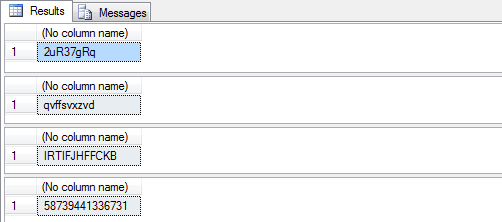
declare @newpwd varchar(20) -- all values between ASCII code 48 - 122 excluding defaults exec [dbo].uspRandChars @len=8, @output=@newpwd out select @newpwd -- all lower case letters excluding o and l exec [dbo].uspRandChars @len=10, @min=97, @range=25, @exclude='ol', @output=@newpwd out select @newpwd -- all upper case letters excluding O exec [dbo].uspRandChars @len=12, @min=65, @range=25, @exclude='O', @output=@newpwd out select @newpwd -- all numbers between 0 and 9 exec [dbo].uspRandChars @len=14, @min=48, @range=9, @exclude='', @output=@newpwd out select @newpwdHere is sample output from the above commands:Reference : http://www.mssqltips.com/sqlservertip/2534/sql-server-stored-procedure-to-generate-random-passwords/
Friday, December 26, 2014
How to make a copy of a existing database into new database
This feature is not available in Express version.
Right Click on database -> Task -> Copy Database.
It will open a wizard you have to follow, where you will have to select the source database and enter a new database name to copy whole database objects into the newer one.
Right Click on database -> Task -> Copy Database.
It will open a wizard you have to follow, where you will have to select the source database and enter a new database name to copy whole database objects into the newer one.
Saturday, August 30, 2014
How to round to the nearest whole number in C# ?
I have Googled for it and found some interesting answers:
My problem was solved by simple using on Math.Ceiling
And other interesting answers are :
My problem was solved by simple using on Math.Ceiling
var wholeNumber = (int)Math.Ceiling(fractionalNumber);And other interesting answers are :
Math.Ceiling
always rounds up (towards the ceiling)
Math.Floor
always rounds down (towards to floor)
References :
Friday, August 22, 2014
Microsoft Report Viewer Print Button not Working / Visible in IE 10 & 11
I had created report in on of my client website using "Microsoft Report Viewer Control" but a very known problem with Report Viewer is Printing is not possible in other browser instead of Internet Explorer.
Today I have faced a new problem that Print Button is not visible in IE 11 when Client updated their Windows 8 to Windows 8.1.

Then I started goggling and Finally I found that it's happens because of Active X. And I followed these steps give below.
- Start Windows Internet Explorer.
- On the Tools menu, click Internet Options.
- On the Security tab, click Local Intranet, and then click Sites
- Click Advanced.
- Type the URL of your site in the Add this website to the zone box, and then click Add. (in development mode it will be http://localhost)
- Click Close to close the Local Intranet dialog box, and then click OK.
- On the Security tab, click Custom Level.
- Click Enable for each component that is listed under ActiveX controls and plugins.
- Click OK to close the Internet Options dialog box.
- Restart Internet Explorer
- Try printing the report.
It's working fine now !!!.
Hope it will help you. :)
Friday, May 9, 2014
Maintain Scroll Position on Postback in ASP.NET
After a long time googling I have got a good solutions to maintain scroll position. See the post given below.
This feature is an absolute must-have on large web pages built for postback scenarios.
This article shows how to allows pages to automatically maintain the current scroll position across postbacks.
The MaintainScrollPositionOnPostback page directive attribute allows to do that.
This feature is useful for large pages where scrolling is necessary to view input controls down further on the page.
There are three ways of applying the property to a web page.
- You can set it programmatically
Page.MaintainScrollPositionOnPostBack = true; - In the page declaration
<%@ Page MaintainScrollPositionOnPostback="true" %> - Or in the web.configs <system.web> section.
<pages maintainScrollPositionOnPostBack="true" />
This feature is an absolute must-have on large web pages built for postback scenarios.
A simple but very useful feature.
Smartnavigation = true implemented the same feature in 1.1 framework SmartNavigation only had "issues" and it only worked in IE but the new MaintainScrollPositionOnPostback apparently works in most common browsers.
Subscribe to:
Posts (Atom)